最新目錄光碟
國小.國中.高中教學
線上課程綜合教學
電子書綜合教學
公職國考.研究所(單科)
公職國考就業(套裝)
專業繪圖軟體
程式軟體光碟
知識、遊戲、音樂
|
 您現在的位置:網站首頁  專業繪圖軟體
電子.電機.電信應用軟體
光碟詳情 |
|
| 商品編號: | EIC1352 | |
| 商品名稱: | Wade Instruments and Service Inc EZ Schematics v5.1.35 | | | 語系版本: | 英文正式版 | |
| 商品類型: | 電氣圖紙設計軟體 | |
| 運行平台: | Windows XP/Vista/7 | |
| 更新日期: | 2012-02-05 | |
| 光碟片數: | 1片CD光碟 | |
| 銷售價格: | $100元 | |
| 熱門標籤: | 電氣圖紙設計軟體
Wade
Instruments
Service
Schematics
| |
Wade Instruments and Service Inc EZ Schematics v5.1.35 英文正式版(電氣圖紙設計軟體)
關掉主程式,破解檔放置於crack夾內,請將破解檔複製於主程式的安裝目錄內既可破解
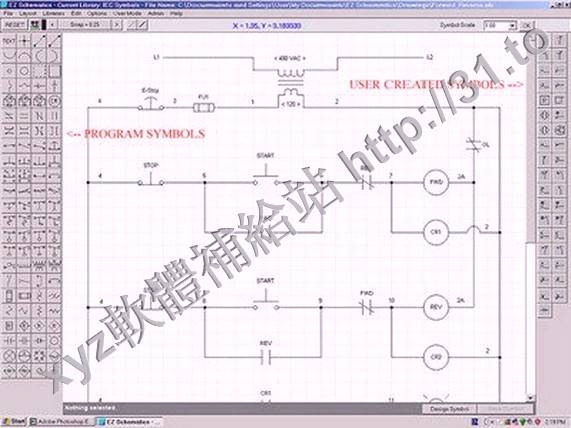
EZ Schematics是1款利便的CAD軟體,通過它你大要輕鬆地製作出各種電氣圖紙。
EZ Schematics is the easiest Cad program available for
developing electrical schematics. Just click on a symbol,
click in the circuit and it's inserted. Every symbol is sized
to an increment of 1/4' (which is the default snap).
Electrical CAD Software - Motor Control Logic, Line Diagram
Software
WHAT'S NEW?!! Not only can the end user can create their own
symbols and libraries, they can share them with others.
Whether you're an Electrical Engineer, a Student or an
Industrial Maintenance Electrician, there's simply no easier
way to draw and print electrical schematic diagrams than with
EZ Schematics. Read our press release.
This software program was designed by an industrial
electrician with over 20 years experience in both
troubleshooting and training in control relay logic (similar
in many regards to PLC logic). The application, established in
a line diagram format, provides the end user with the ability
to quickly and easily transform logical concepts into a
professionally diplayed electrical schematic.
Admittedly, as a stand-alone CAD program, EZ Schematics does
not offer all of the features nor the capabilities of AutoCad
and other well established CAD software applications. But with
the learning curve set far lower than the aforementioned,
you'll never find an easier method to transform electrical
relay logic concepts into digital documents (as line diagrams)
that can be saved and printed with professional appearance.
What makes EZ Schematics a better CAD program for producing
electrical schematics includes the following:
1. Ease of use. There's no other Cad program available that's
easier to learn than EZ Schematics.
2. Every electrical symbol is created in 1/2' scale increments
designed to align perfectly with the default snap (also set at
1/2'), thus making precise placement of the symbols a simple
procedure.
3. Only symbols pertinent to typical U.S. electrical
schematics are available (approx. 60). Thus, there's no waste
of time in pouring over thousands of choices.
4. When inserting a symbol, smart choice labeling is employed.
For example, when inserting a control relay coil, 'CR' is
automatically attached as the standard beginning label
anticipating it to be followed by '1' or '2', etc.
5. The 'Line' control (the most popular device) becomes
readily available by simply double-clicking anywhere in the
drawing.
6. Labeling the wire numbers is performed easily and
precisely. Just click and type at the location of choice.
Never before has there been a CAD program easier to use than
EZ Schematics. If you need to draw electrical schematics
quickly and easily, this is a software application you can
depend on.
|
|
|